
your funnels, in chat
Tiny Funnel has an MCP server. Connect it once to ChatGPT, Claude or any other client that speaks MCP, and the chat can read your funnels for you: the steps, the numbers, the sources, the individual journeys.
https://tiny-funnel.com/mcp
Everything it reads comes from the same code the dashboard renders, so the two can never disagree with each other. It is read-only: there is no tool that edits a funnel, changes a plan, or sends anything anywhere.
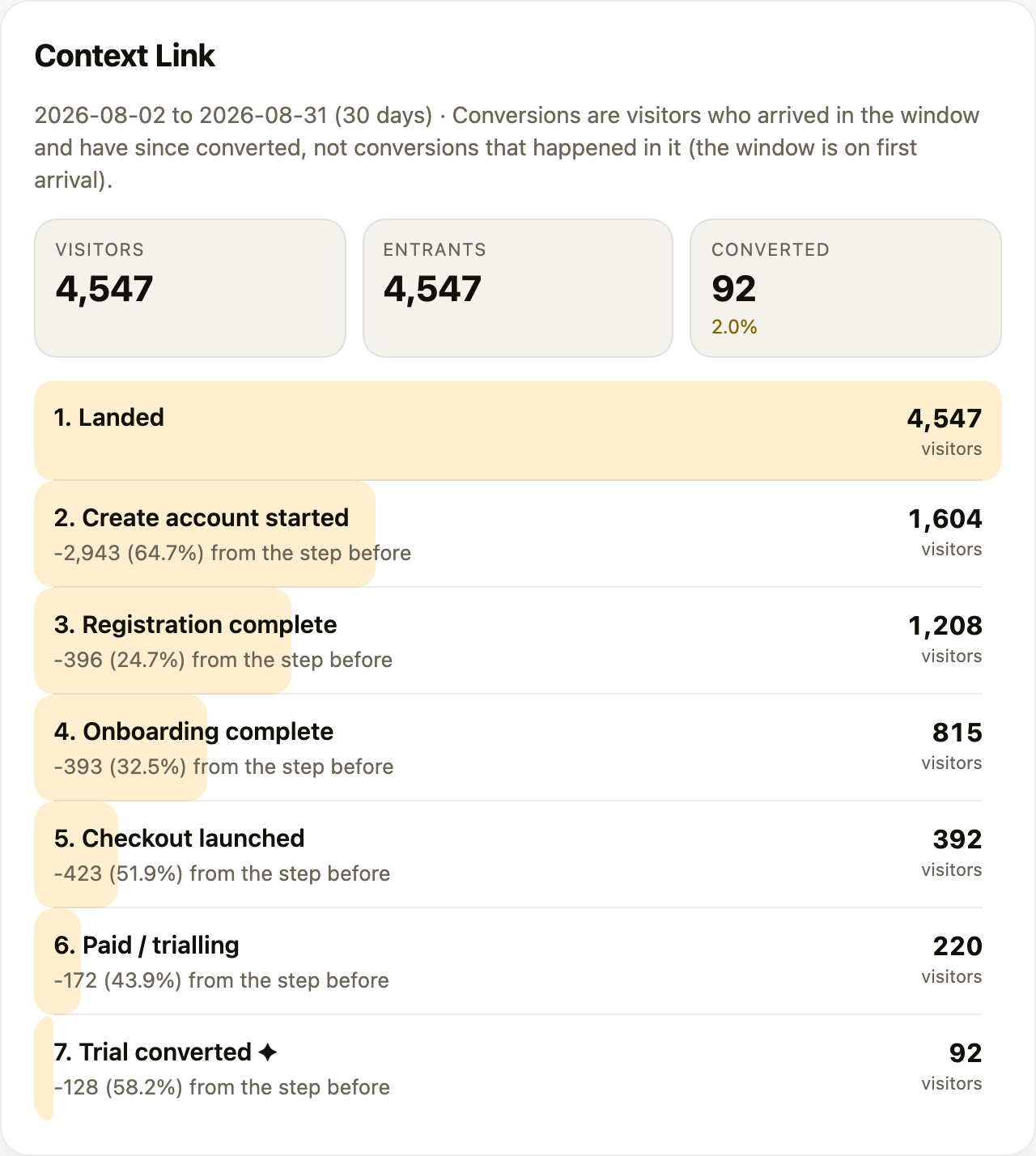
Where the client supports it, an answer arrives with a panel like this one beside it, drawn from the same numbers the model is reading.
What people ask it
Plain questions work. The model picks the tools, pages through whatever it needs and does the judging.
- "Which landing pages convert best, and what should I write next?"
- "What is the top-converting source of traffic this month?"
- "Why did conversions drop last week?"
- "Pull every entry page with visitor and conversion counts, then show me just the ones about pricing."
- "Somebody signed up from Germany yesterday. What did they look at first?"
One thing worth knowing before you read an answer: a window is on when visitors first arrived. So conversions for August are people who arrived in August and have since converted, not conversions that happened in August. The tools say this on every answer that carries a conversion count, and a good model repeats it.
The tools
Ten, all read-only.
| Tool | What it answers |
|---|---|
list_funnels |
Every funnel your account can read, with status, steps, domains and the last 7 days of visitors |
get_funnel |
One funnel's definition: its domains, its ordered steps, and which step counts as a conversion |
funnel_report |
The readout: visitors at each step, drop-off between them, the totals, and the biggest leak |
funnel_breakdown |
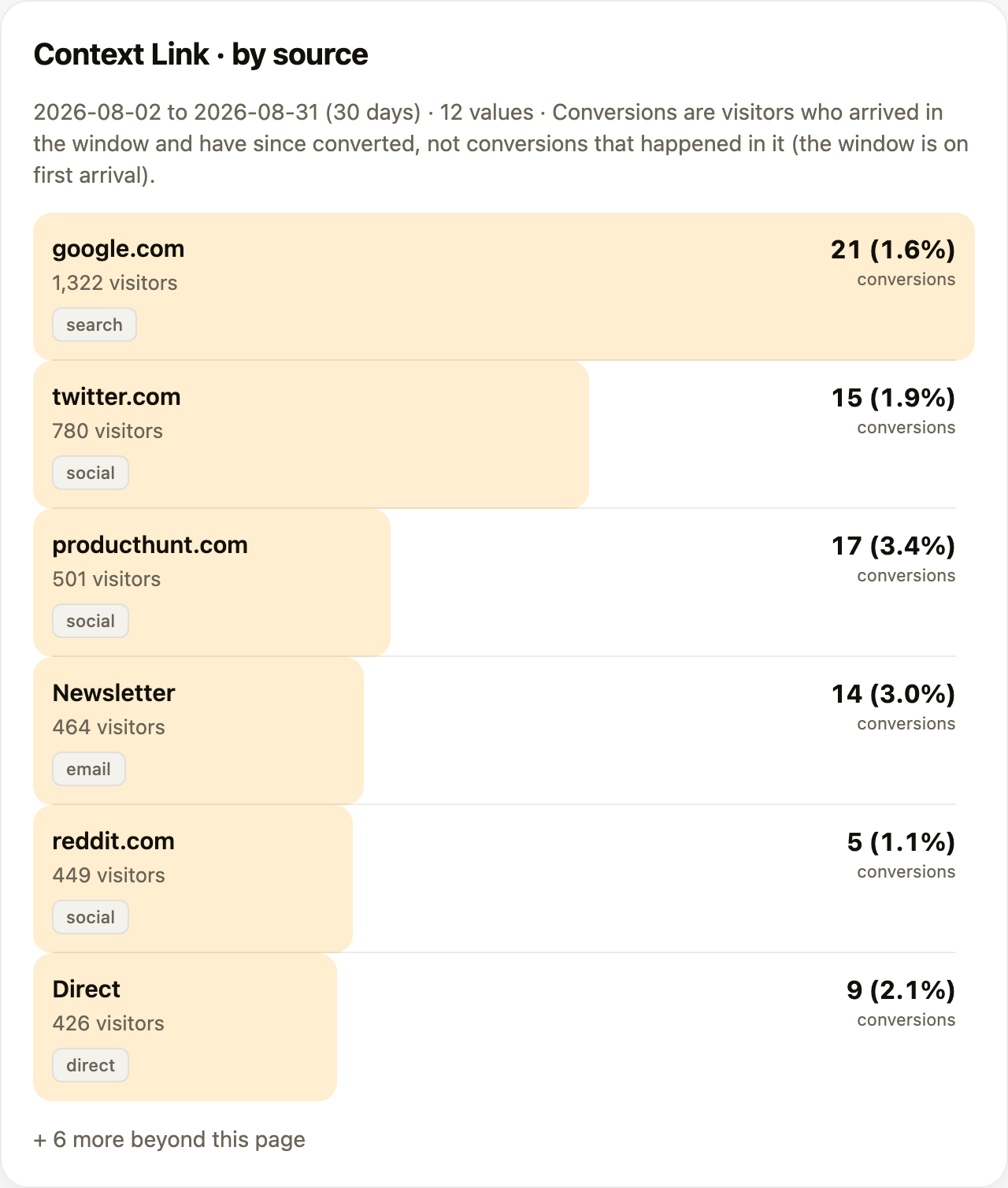
Visitors and conversions grouped by entry page, referrer, UTM, country, source or channel. It pages, so a whole dimension can be read, not just a top five |
funnel_trend |
Counts over time, one bucket per day or per calendar week |
funnel_insights |
The "what changed and why" digest: this period against the one before, with movement, growing pages and the biggest leak |
list_visitors |
Individual visitors: entry page, source, channel, country, how far they got, whether they converted |
get_visitor |
One visitor's journey in order, with their pageviews, clicks and server events, and the gaps where they went away and came back |
list_page_changes |
Edits detected on your own pages, to line up against a move in the numbers |
funnel_health |
"My numbers look wrong": whether the funnel is tracking, when a hit last arrived, domains being turned away, server events that matched nobody |
Every funnel tool takes the same filter set the dashboard has: a date window, entry page, referrer domain, UTM source, country, channel, and furthest step reached.
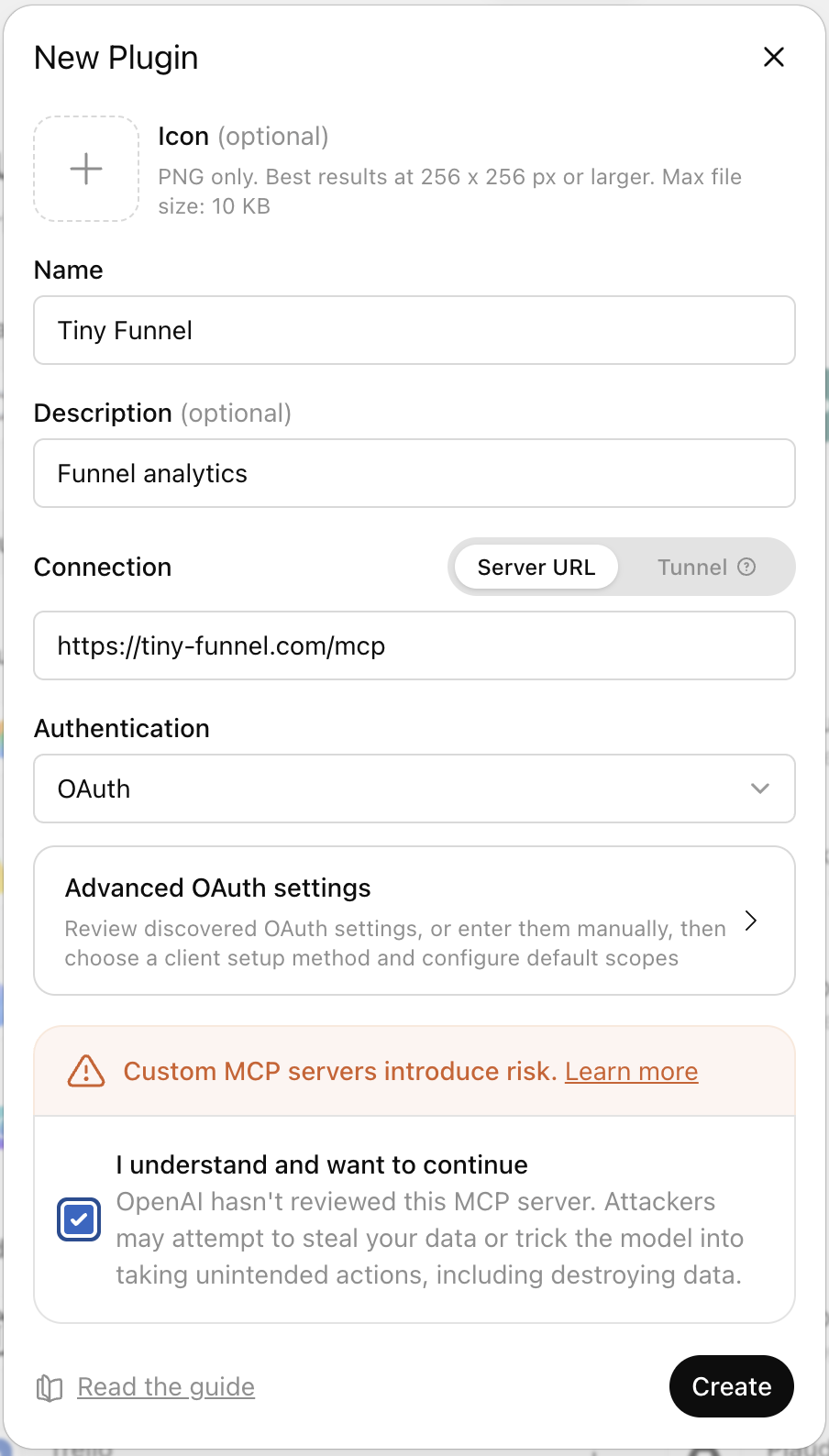
Add it to ChatGPT
Do this in a browser, at chatgpt.com/plugins. The desktop app has a plugins screen of its own, but at the time of writing it does not reliably start the sign-in, so the connection is created and never authorised.
Press + to open New Plugin, and fill in four things:
- Name: Tiny Funnel. The description is optional, and "Funnel analytics" is enough.
- Connection: leave it on Server URL and paste
https://tiny-funnel.com/mcp. - Authentication: OAuth. Nothing under "Advanced OAuth settings" needs touching, since ChatGPT discovers all of it from the server and registers itself. There is no client id, no secret and no API key.
- Tick I understand and want to continue, which every custom MCP server has to be accepted with, then press Create.
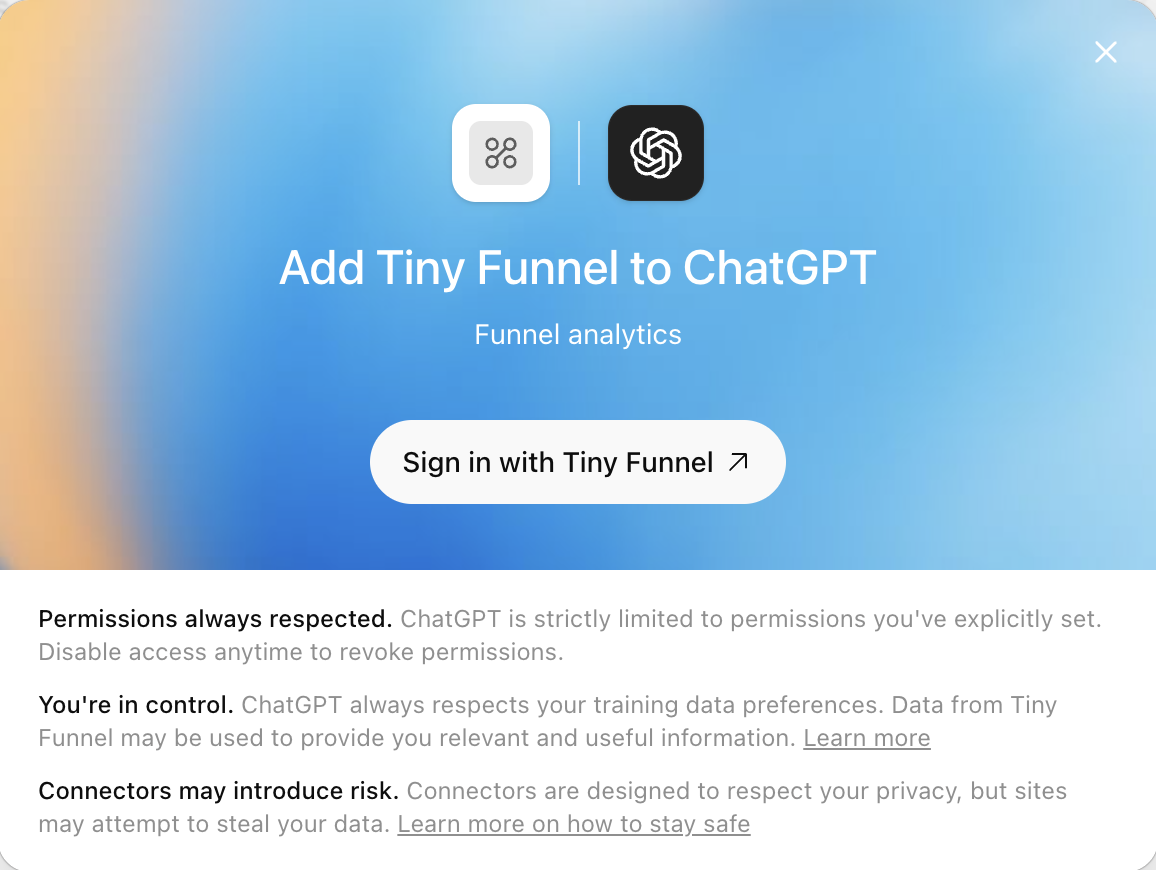
ChatGPT then offers to sign you in. Press Sign in with Tiny Funnel, and approve the connection in the window that opens.
After that, ask for it by name in a chat ("check Tiny Funnel for...").
Add it to Claude
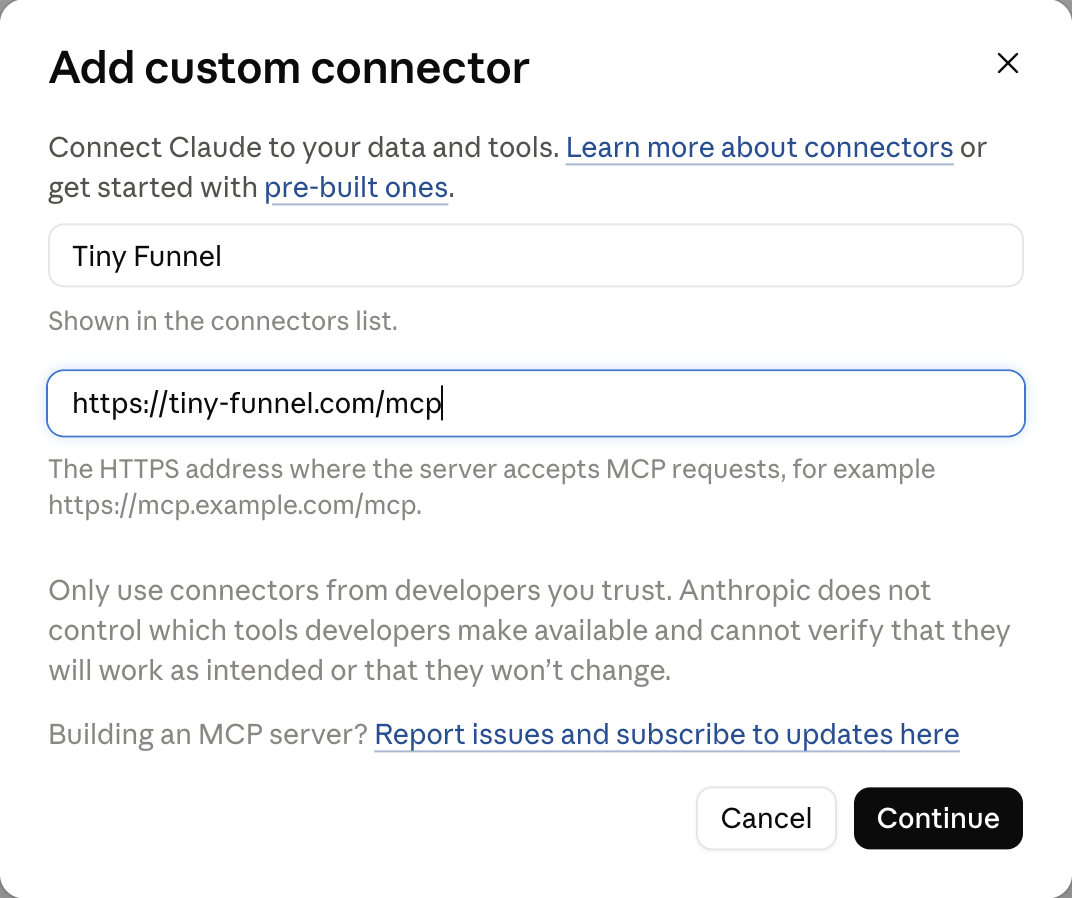
In Claude, open Settings → Connectors, then Add → Add custom connector. Give it a name (this is what the connectors list shows) and paste https://tiny-funnel.com/mcp as the address, then press Continue.
The next screen asks two questions:
- Authentication: choose Required when the server asks. Claude will connect, then send you to Tiny Funnel to sign in the first time it actually calls a tool. "Always required" works too, if you would rather sign in up front. Do not choose None: Claude offers it because our server lets a client list its tools before anyone signs in, but every tool that reads data needs an account behind it.
- OAuth client: the dialog opens on Anthropic's hosted client metadata and recommends it. Change it to No client ID, register one automatically. Tiny Funnel mints a client for you as you connect, and does not host client metadata, so the recommended option has nothing to read.
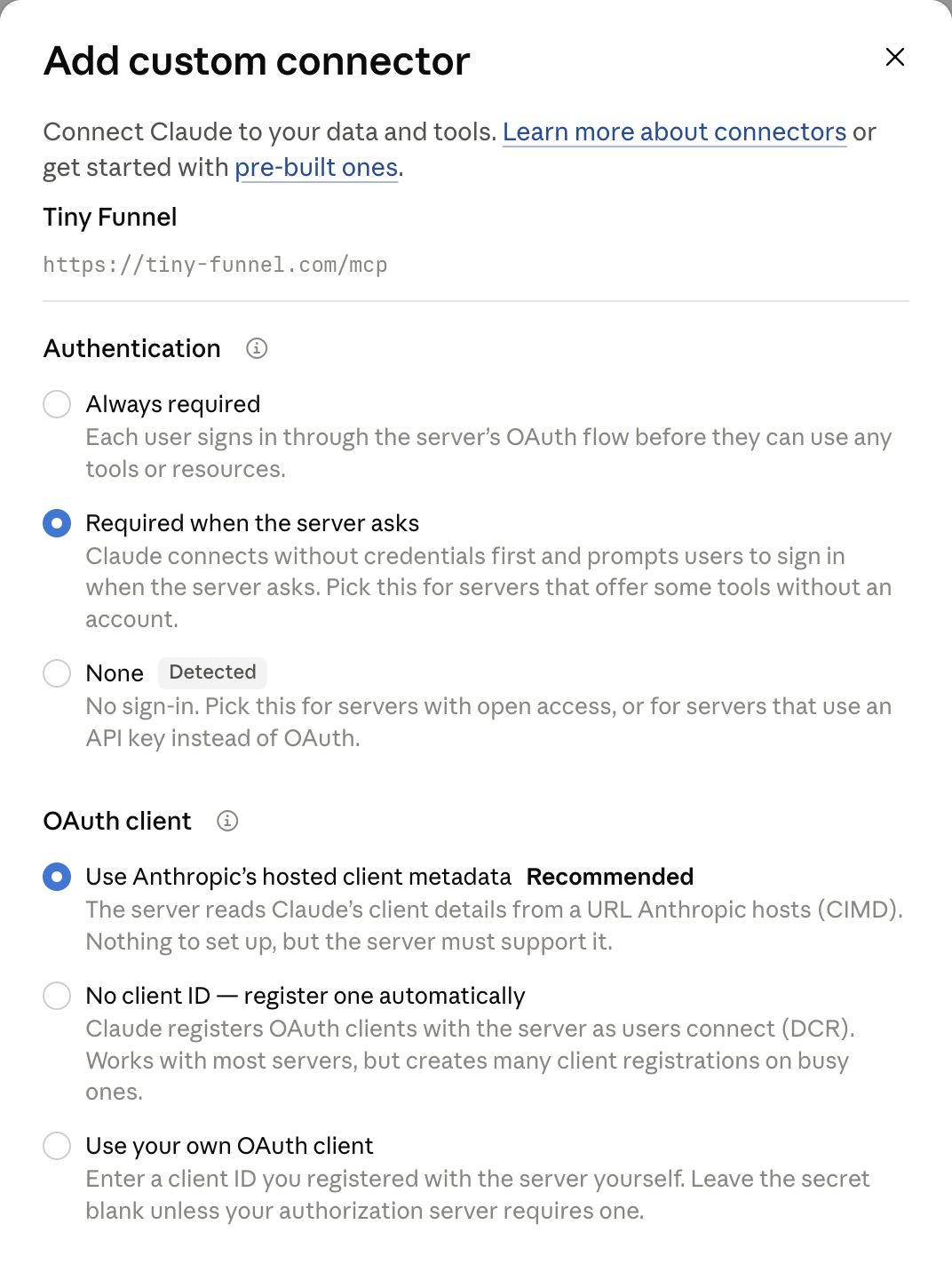
Nothing else on that screen applies: leave managed authorization off and add no request headers. Press Add, then Connect on the connector's row, and approve the connection when Tiny Funnel asks. It then appears in the tools menu of any new chat.
Add it to anything else
The server is Streamable HTTP with OAuth 2.1, and it registers clients dynamically, so any current MCP client can connect with the URL alone.
In Claude Code:
claude mcp add --transport http tiny-funnel https://tiny-funnel.com/mcp
In an editor or client that takes a config file:
{
  "mcpServers": {
    "tiny-funnel": {
      "type": "http",
      "url": "https://tiny-funnel.com/mcp"
    }
  }
}
A client that only speaks stdio can reach it through a bridge such as mcp-remote.
What it can see, and what it cannot
It sees the funnels your own account can read, and nothing else. Connecting is signing in: the approval screen names the app asking, shows the address your access is being sent to, and lists what it will be able to do. If a name or an address is not one you expect, deny it.
It is read-only. All ten tools read. The write permission is requested up front so that a future tool that does change something will not need you to reconnect, but nothing uses it today, and a tool that did would say so on this page first.
It is rate limited to 60 tool calls a minute per connection, which is far past what a conversation does and short of what a runaway loop does.
Disconnect from the client's own settings. Removing the connector in ChatGPT or Claude is what ends the access. There is nothing to clean up on the Tiny Funnel side.
We train nothing on your data. What happens to an answer once the client has it is governed by that client's own terms, so treat a chat window the way you would treat a shared dashboard.