
how to track a conversion that happens in a webhook
The short version
- A conversion that completes on your server is invisible to a browser-only tracker, and the thank-you page is the workaround that hides the problem rather than fixing it
- Post a named event from your backend and it attaches to the visitor who caused it, instead of arriving as a stranger
- Matching goes your own user id, then the visitor token, then the IP address. The person beats the browser beats the network
- Send an idempotency key, because your payment provider will deliver the same webhook twice sooner or later
- When nothing matches, the event is recorded as a drop and listed on your Install panel, which is usually the only way anybody finds out
Post the event from the webhook handler you already have, and match it to the visitor who caused it. That is the whole mechanism: one HTTP request out of your backend, attached to a browser your funnel has already seen, counted as a funnel step like any other.
Most people do something else first, because the tracking script lives in the browser and a page view is the easy thing to count. They redirect to a /welcome page after checkout and treat arriving there as the purchase. It works until you look at it.
Worth saying up front: this is the one piece here that assumes somebody can edit your backend. The change is small, one HTTP request from a handler you have already written, but if that person is not you, the next section is the part you need. It explains why the number you are reading today is wrong, which is the argument to hand to whoever does deploy your code.
The thank-you page is not the conversion
Counting arrivals at /welcome is counting a redirect, and a redirect is a much weaker claim than a payment. Four things go wrong, and they go wrong quietly.
| What happens | What your funnel says |
|---|---|
| The visitor closes the tab before the redirect completes | A purchase you were paid for never happened |
| The page gets bookmarked, refreshed or shared | One purchase counted three times |
| The payment provider hosts the confirmation page | Nothing at all, because your script is not on their domain |
| A delayed payment method fails after the redirect | A purchase that was never completed, sitting in your conversion count |
None of those is exotic. The refresh one alone is enough to make a conversion rate wrong in the flattering direction, which is the worst direction for a number to be wrong in.
And a renewal never touches a browser at all. A subscription that rebills on the 14th, an invoice paid on a schedule, an enrolment your course platform confirms twenty minutes later: there is no page view to attach any of it to, because nobody was looking at a page. It is the normal shape of both a software funnel and a course funnel, which is why the last step of one so often has to come from the backend.
What you send from your webhook handler, and what it becomes
Tracking a conversion that happens in a webhook is three moves:
- Post the event. One authenticated HTTP request out of the handler you already have
- Match it to a visitor. Send whatever identifies the person, and the strongest matcher wins
- Count it as a step. Add a step with the same name, and it lands in the funnel like any other
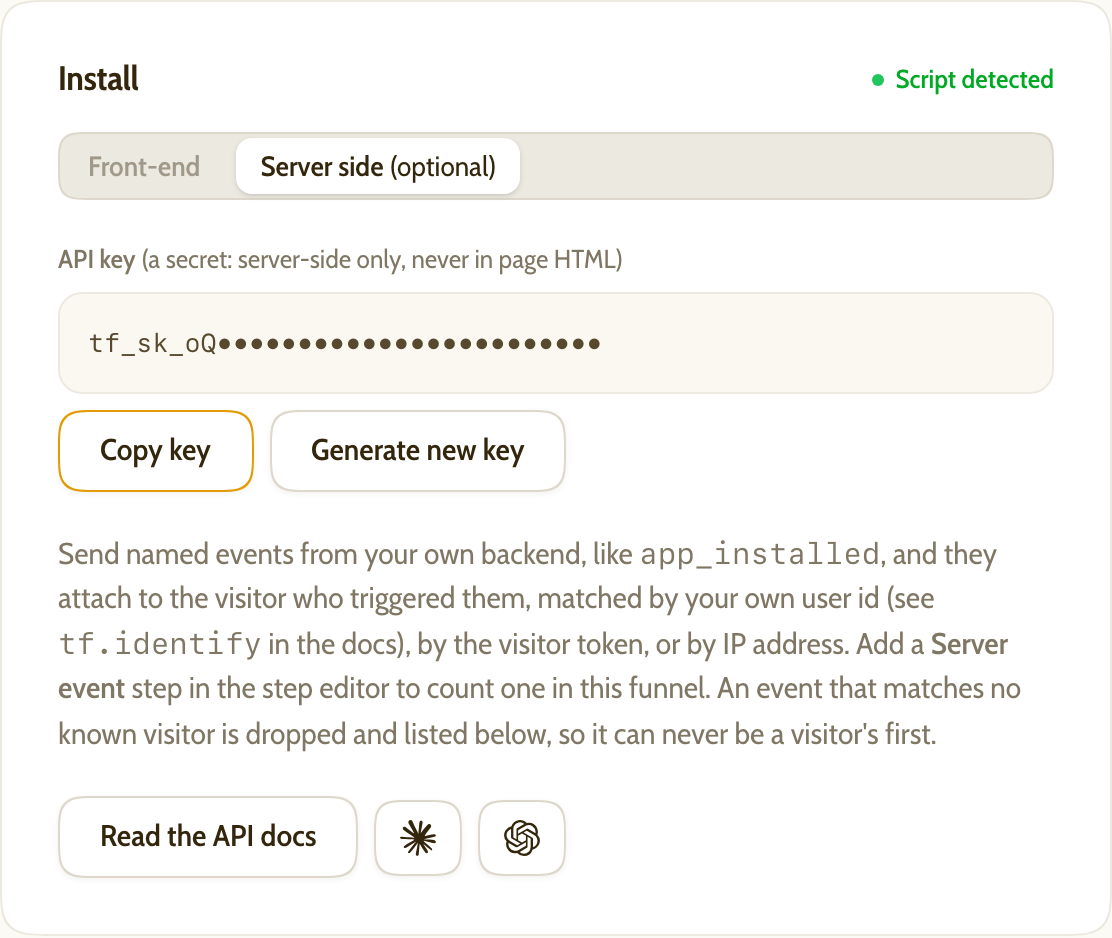
Here is the first one. The server-events API takes a named event, Bearer-authed with your funnel's own API key from the "Server side" tab of the Install panel:
curl -X POST https://tiny-funnel.com/api/v1/events \
  -H "Authorization: Bearer YOUR_API_KEY" \
  -H "Content-Type: application/json" \
  -d '{
    "name": "subscription_started",
    "external_id": "42",
    "uid": "evt_1QxYz"
  }'
It answers 202 with the uid it used, because matching happens after the response. Accepted is not the same as matched, which matters later.
uid is an idempotency key and you should always send one. Stripe's own guidance is blunt about why: webhook endpoints "might occasionally receive the same event more than once". Send the same uid on a redelivery within a few hours and the event is counted once. Send none and one gets minted for you, which protects the write but does nothing for your retries.
Be aware of the edge, because providers retry for days rather than hours. The guard is a short-lived key, not a permanent record, so a redelivery long after the original can still land twice, and so can one that arrives while our cache is unreachable, which fails open on purpose (a duplicate beats a lost conversion). If your provider retries over days, keep your own note of what you have already sent.
Send it from a background job, never inline in the request. Your checkout should not wait on anybody's API, and a network blip should not lose a payment you have already taken. Capture what you need in the handler, enqueue with a stable uid, and let your queue's retry policy do the rest.
Then make it a step. In the step editor you add a step of type Server event and give it the name, subscription_started here. Names are case-sensitive and have to match exactly. An event whose name matches no step still appears in the visitor's journey, which is a useful way to check the integration is landing before you wire the step up.
How server-side conversion tracking finds the right visitor
This is the part nobody writes down. Sending the request is easy; deciding whose conversion it is takes a rule, and the rule is that stronger matchers win.
| What you send | What it matches | What it costs you |
|---|---|---|
external_id |
The person, in whichever browser they are in now | You have to identify signed-in visitors first |
visitor_token |
Exactly one browser, exactly | You have to carry the token through your own stack |
ip |
The most recently seen visitor from that address, within 30 days | An address names a network, not a person |
Send everything you have. They are tried strongest first, so a delivery carrying all three costs nothing and degrades gracefully.
The IP branch is the one to be careful with, and it is treated carefully. An office or a household shares an address, so a match is a guess about which person on that network converted. If you also send the visitor's user_agent, candidates from a conflicting device family are skipped outright, so a purchase made on Windows never lands on an iPhone's journey. A missed match beats a wrong one, every time.
One rule has no exceptions: a server event can never be a funnel's first sight of somebody. It attaches to a visitor the script tag has already seen, or it is dropped. An event with no browsing behind it has no entry page and no referrer, so counting it would inflate the bottom of your funnel while the top stayed still.
Getting an id as far as the handler
Two ways, and the second is the one to build.
Carry the token. On any page running the script, window.tf.visitor() returns the visitor's id. Put it somewhere your backend will see it again: a hidden form field, a header, or a field on the checkout you are about to create. Stripe's Checkout Session carries a client_reference_id for exactly this kind of thing, and it comes back on the webhook.
There is no app to install and no connector to authorise. You are putting a string in a field you already have and reading it back out.
Identify the person instead. Once somebody signs in, hand over your own id for them with tf.identify("42") or a tf-user meta tag, then send that same value as external_id on every server event. This is the durable version, because the token names a browser and your user id names the person. The identity docs cover both, and what a cookie-less visitor id actually is explains why the distinction matters more than it sounds.
It pays twice, as well. A server event that matches by token or IP but carries an external_id writes that id onto the visitor, so your webhooks quietly become the most trustworthy identify you have. They are Bearer-authed and they come from your own backend, which is more than can be said for anything running in a browser.

When nothing matches
Sometimes nothing does, and the failure is silent by construction: the API accepted the delivery, your logs say delivered, and the funnel says nothing happened. That silence once cost a month of debugging, which is why it does not exist any more.
Every event that matches nobody is recorded, and the Install panel's server tab reads the last seven days back as three numbers: counted in the funnel, attached with no matching step, and matched no visitor. Underneath, the most recent drops with the event name and which matchers the delivery carried, as flags rather than values. "You sent only an IP and it matched nobody" and "you sent nothing to match on" are different bugs, and that line is what tells them apart. Drops are kept for 30 days.
Then there is the trap, which is worth knowing before it happens to you. Your visitors reach the tracker over whatever their connection gives them, which for most dual-stack connections is IPv6. If your own app is reachable only over IPv4, the address your handler captures is a v4 address for a visitor recorded under a v6 one, and those can never match. Not rarely. Never.
What makes it expensive is that everything looks right. Your code is correct, your deliveries are accepted, and waiting does not help. So the mismatch is detected and named on the panel rather than left as a run of unexplained drops, with the two fixes that work: put both properties behind the same connectivity, or send external_id, which does not need the addresses to agree about anything.
The thing a browser-only script cannot do
Plausible, Fathom and the other small analytics tools are good, and they are simple on purpose, which is a decision I have a lot of respect for. This is not a shortcoming in any of them. It is a boundary: a script that runs in a browser can only report what a browser can see, and a webhook is not something a browser can see.
The funnel is where that boundary starts to hurt, because the last step is usually the one that pays. A funnel whose final step is a thank-you page redirect is measuring intent to buy and calling it a purchase. Being able to close it with the event your backend already fires is not a heavier tool, it is the same simplicity pointed at the part of the path that happens off-browser.
Frequently asked questions
How do I track conversions that happen on my server?
Post a named event from your backend to the analytics tool, with something to identify the visitor: your own user id, their tracking token, or the IP address of the request you handled. The tool attaches it to that visitor's journey, and a funnel step with the same name counts it.
Can I just fire the conversion from my thank-you page instead?
You can, and it will be wrong in both directions. Refreshes and shared links inflate it, closed tabs and failed delayed payments deflate it, and renewals never appear at all. It is fine as a first move on day one, and worth replacing before you make a decision on the number.
What if somebody bought on a different device from the one they browsed on?
That is exactly what external_id is for. If your pages identify signed-in visitors with your own user id and your events carry the same value, the conversion lands on the person rather than on one of their browsers.
Will a retried webhook count the conversion twice?
Not if you send a uid and the retry lands within a few hours, which covers nearly all of them. Use the payment provider's own event id, since it is stable across their retries. For a redelivery days later, keep a record on your side of what you have already sent.
Do I need a tag manager or a server-side container for this?
No. Those exist mostly to forward conversions to ad platforms, which is a different job. This is one authenticated HTTP request from code you have already written.
Close the last step
The conversion your business runs on probably finishes somewhere the browser cannot follow: a webhook, a callback, a scheduled invoice. You already know when it happened, because your backend acted on it.
So send it, match it to the person who caused it, and let the last bar in the funnel mean what it says. Then the rest of the report is worth reading, because the number at the bottom is the one your bank agrees with, and the report finally answers the question worth asking: where these buyers came from, where they went, and how many of them made it.
Getting there is one script tag, a walk through your own flow to record the steps, and one authenticated request from code you have already written. You can track your own funnel for seven days, no card, and find out whether the bottom of yours has been telling you the truth.